
The journal
Do environment variables need quotes?
Quotes depend on the shell or .env parser. Compare Bash assignments, Node’s environment-file format and Dotenvx interpolation, then verify a harmless test value.

Environment-variable values do not always need quotes. The rule depends on what reads the text: a shell command, Node’s built-in .env loader, or a package such as Dotenvx. Quote marks can be syntax used to group a value; they are not automatically characters you want inside the value.
Keep three questions separate: how the value is assigned, how it is expanded in a command, and how an environment-file parser interprets it. A rule that works in one context is not a specification for every other loader.
In a shell: assignment and use are different
In Bash, quote a literal value containing spaces or shell-special characters so it stays together. An assignment has no spaces around the equals sign. To make a shell variable available to child processes, export it; an ordinary local assignment and an exported environment variable are different things. See the Bash environment reference.
TASK_NOTE='hello world'
export TASK_NOTE
printf '%s\n' "$TASK_NOTE"
The example prints a deliberately non-sensitive demonstration value. Double-quoting an expansion when passing it as a command argument protects it from word splitting and filename expansion. Quoting an assignment and quoting a later command argument solve different problems; start with the Bash quoting rules for the shell you actually use.
Other command languages have their own syntax. Do not copy Bash assignment examples into PowerShell or a Windows command prompt and assume they mean the same thing.
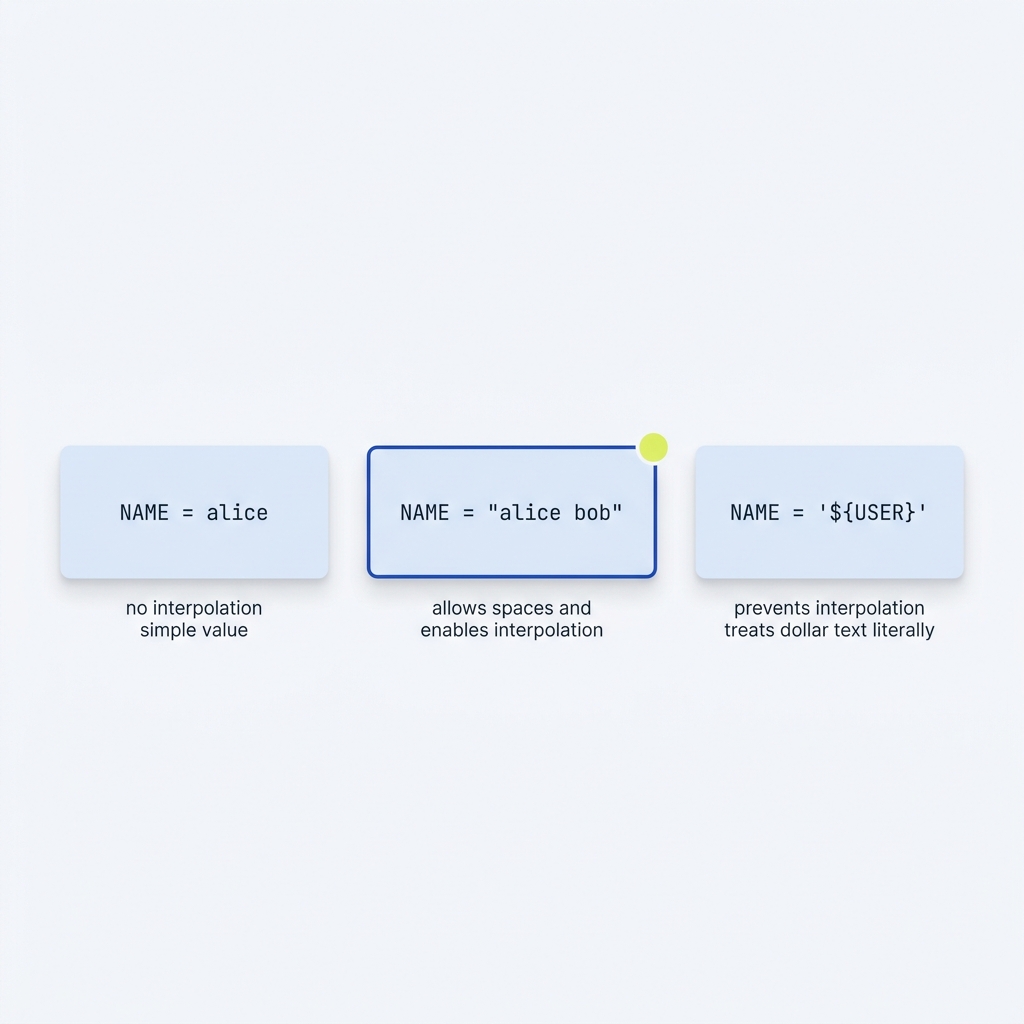
In Node’s .env format: quotes are optional delimiters
Node defines its own environment-file format because there is no single formal .env specification shared by all tools. Its current documentation allows values with single or double quotes, supports quoted values across multiple lines, and treats the parsed values as strings. Thus a textual value of true is not automatically a JavaScript boolean.
In that format, surrounding whitespace is ignored unless it is inside quotes. A hash outside quotes begins a comment, while a hash inside quotes remains part of the value. These are Node-specific rules, described in the current Node environment-variable documentation.
QUOTING_DEMO="space value # literal"
PLAIN_VALUE=hello
TEXT_BOOLEAN=true
# A comment on its own line
This explains why an environment file can accept spacing that would not be a shell assignment. Treat it as input for its intended loader rather than assuming it is a shell script. For embedded quotation marks or multiline values, check the documentation for the Node version you deploy and test that exact format.
Dotenvx adds its own interpolation rules
Dotenvx documents interpolation for unquoted and double-quoted values, with single-quoted values remaining literal. That distinction matters when a value contains $ or a braced variable reference. It also documents escape sequences in double-quoted values. See its environment-file syntax and examples.
DEMO_HOST=example.test
DEMO_URL="https://${DEMO_HOST}/api"
DEMO_LITERAL='${DEMO_HOST}'
With the documented Dotenvx behaviour, the URL uses the referenced host while the literal example keeps the variable-reference text. Do not assume another loader provides the same interpolation.
Inline comments also need care. Dotenvx’s syntax table distinguishes a hash separated from an unquoted value by whitespace from a hash attached to that value. For portable examples, put comments on their own lines and quote a value that must contain a literal hash. Avoid turning one parser’s comment rules into a universal rule for every .env file.

Verify a dummy value in the actual runtime
Create a temporary .env.demo containing only the non-sensitive QUOTING_DEMO example above. With a Node version supporting the flag, inspect the resulting string:
node --env-file=.env.demo -p 'JSON.stringify(process.env.QUOTING_DEMO)'The JSON representation makes spaces and remaining quote characters easier to inspect. Use this technique with test data, not production secrets. An older issue report can help investigate a particular version, but it is not enough to declare that every current release has the same limitation.
Quote-handling checks
Two common follow-up questions
Should I remove quotes from process.env myself?
First establish why they are present. With Node’s documented .env delimiters, the parsed value is a string representing the value. Ad hoc stripping can damage intentional quote characters. Correct the assignment or loader configuration and verify a dummy example instead.
Why does spacing around equals work in a file but fail as a shell assignment?
The two inputs have different readers. Node’s environment-file parser permits surrounding whitespace, while a Bash assignment uses the variable name directly followed by equals. Use the syntax documented for the actual reader.
